Configure Netscape & Internet Explorer to Download Files
This function is no longer used but included as reference.
This section references Netscape 4.5+ on a Macintosh.
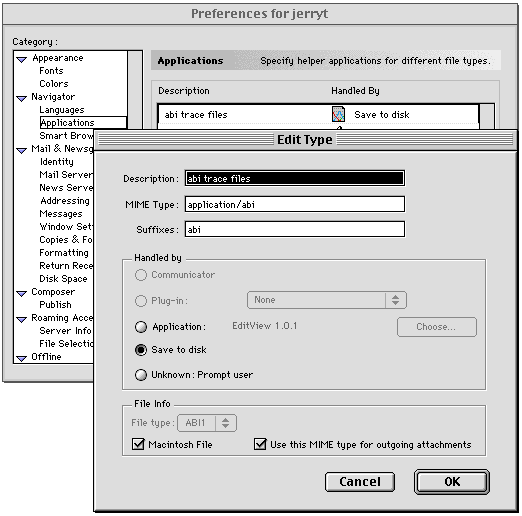
1. Select "Preferences..." from the Netscape Edit menu. The Preferences dialog box is displayed.
2. Within the "Category" scroll list, select "Navigator", then select "Applications".
The Preferences dialog box appearance will change to include the "Application Helper" function.
3. Select the "New" button. The "Edit Type" window is displayed.
4. The "Edit Type" window has three text boxes and an area called "Handled by" that is composed of
a series of radio buttons. Enter the following information then select the "OK" button.
Description: abi trace files
Mime Type: application/abi
Suffixes: abi
Handled by: Application
Select the Choose... button, navigate to the location of the EditView application, and select EditView.
This will populate the "File Info" frame "File type" box with ABI1.
Select the "Macintosh File" check box. Change "Handled by:" to "Save to disk"
5. The Preferences dialog box is displayed. Select the "OK" button to close the window.
Preference file configuration for ABI Trace Files
 This section references IE 4.5+ on a Macintosh.
Using a similar method as described above, edit IE's preference file File Helpers.
Description: abi trace files
Extension: abi
Within the "File Type" frame, select the Browse button and select EditView.
This will fill the "File type" with ABI1 and "File creator" with EdVw.
Within the "Download Destination" frame, identify a download directory.
Within the "Handle" frame, select Save to File.
Use this same method to enter the information for Sequence files.
This section references IE 4.5, IE 5, and Netscape 4.04 on a PC.
Download and install the trace viewer of your choice. Ensure that the selected application uses a
file extension of "abi". Chromas is a useful trace viewing application. After Chromas is installed,
the IE Internet Options or the Windows File Types do not require modification to download (FTP)
sequence or trace files.
Download Sequence Files --
Use the Retrieve DNA Sequencing Results hyperlink to display the summary table of sequencing results.
1. Hold down the shift key and select a sequence hyperlink with the left mouse button. The sequence
will be displayed in a separate window.
2. Using the File pull down menu, save the file. Repeat this procedure to download other sequence files.
Download Trace Files --
1. Select a trace hyperlink with the left mouse button. A File Download dialog box will appear
prompting the user to save the file to disk, select OK.
2. A Save As dialog box appears. Save the trace file.
Configure Other Mime/File Types
This section references IE 4.5+ on a Macintosh.
Using a similar method as described above, edit IE's preference file File Helpers.
Description: abi trace files
Extension: abi
Within the "File Type" frame, select the Browse button and select EditView.
This will fill the "File type" with ABI1 and "File creator" with EdVw.
Within the "Download Destination" frame, identify a download directory.
Within the "Handle" frame, select Save to File.
Use this same method to enter the information for Sequence files.
This section references IE 4.5, IE 5, and Netscape 4.04 on a PC.
Download and install the trace viewer of your choice. Ensure that the selected application uses a
file extension of "abi". Chromas is a useful trace viewing application. After Chromas is installed,
the IE Internet Options or the Windows File Types do not require modification to download (FTP)
sequence or trace files.
Download Sequence Files --
Use the Retrieve DNA Sequencing Results hyperlink to display the summary table of sequencing results.
1. Hold down the shift key and select a sequence hyperlink with the left mouse button. The sequence
will be displayed in a separate window.
2. Using the File pull down menu, save the file. Repeat this procedure to download other sequence files.
Download Trace Files --
1. Select a trace hyperlink with the left mouse button. A File Download dialog box will appear
prompting the user to save the file to disk, select OK.
2. A Save As dialog box appears. Save the trace file.
Configure Other Mime/File Types
| File Type | Description | Mime Type | Suffixes | Handled by |
| Sequence File | Sequence file | application/Seq | Seq | Select Application, Choose Simple Text, File Type=Text, Save to disk |
| Trace File | Trace file | application/abi | abi | Choose ABI Prism EditView, File Type=ABI1, Save to disk |
| dnaLIMS Fasta Library | Fasta | application/fasta | fasta | Choose Simple Text, File Type=Text, Save to disk |
| Unix Tape Archive | Unix Tape Archive | application/x-tar | tar | Choose Stuffit Expander, File Type=Disk |
Administrator Settings
| File Type | Description | Mime Type | Suffixes | Handled by |
| dnaLIMS 377 Sample Sheet | 377 sample sheet | application/ss | ss | Choose ABI Prism 377 Collection, File Type=Text, Save to disk |
| dnaLIMS 3700 Sample Sheet | 3700 sample sheet | application/plt | plt | Choose Microsoft Excel, File Type=XLS, Save to disk |
| dnaLIMS Reaction Sheet | dnaLIMS Reaction Sheet | application/rs | rs | Choose Microsoft Excel, File Type=XLS, Save to disk |
| dnaLIMS Invoice File | dnaLIMS invoice file | application/inv | inv | Choose Microsoft Excel, File Type=XLS, Save to disk |
Additional Information, Macintosh Internet Config --
On occasion, when downloading groups of trace files, the trace files are extracted from the tar or zip file but
do not have the correct File Type for EditView.  This can be attributed to Internet Preferences overridding
the Browsers Application Helper section.

Configure Internet Preferences.

  1.  At the Desktop, Select Find... from the File Menu Search for internet preference (or internet config)

  2.  From the Items Found list double click on Internet Preferences.

  3.  From the Internet Preferences Icon display, select File Mappings.

  4.  From the File Mappings window, select Add.

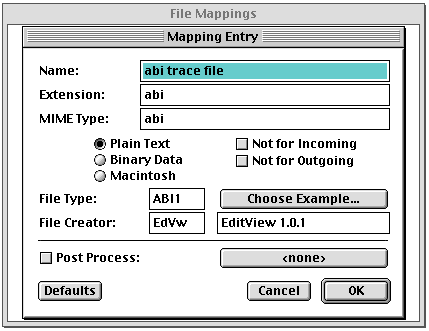
  5.  Within the Maping Entry window, enter:

      Name:           abi trace file
      Extension:      abi
      MIME Type:      application/abi

      Binary Data:    Selected

      Select Choose Example,
      Browse to a readable ABI Chromat file and select it.

      This will populate the:

      File Type:      ABI1
      Creator:        EdVw

  6.  Select Save from the File Menu.